On this page

A datasheet for a dataset is a short, versioned document that records why the dataset exists, what it contains, how it was collected, and how it should and should not be used. Teams that adopt one see fewer production surprises, faster audits, and a paper trail when a model misbehaves and someone has to figure out why. The rest of this piece gives you the lifecycle checklist, a fillable template, and a runbook for turning that document into actual review gates.
TL;DR:
- Providing detailed, specific answers about dataset collection methods, composition, and legal restrictions helps ensure accurate audits and reduces deployment surprises.
- Maintaining and updating the datasheet should be an ongoing process, tied to dataset changes, with version control and clear ownership by original creators.
- Implementing automated checks for class balance, coverage, license compliance, and drift can turn datasheets into active review gates and monitoring tools.
- Vague or outdated documentation risks misleading users and impeding tracing of model failures, emphasizing the need for specificity and regular updates.
- Using machine-readable formats like Croissant alongside the datasheet improves discoverability and validation but does not replace manual reflection on dataset quality and ethics.
Table of Contents
- What Datasheets for Datasets Are and Why They Matter
- What Questions Should a Dataset Datasheet Answer?
- A Fillable Datasheet Template You Can Use Today
- Who Owns the Datasheet After Launch?
- How Datasheets Become Review Gates and Monitoring Checks
- Common Mistakes Teams Make Filling Out Datasheets
- What Legal and Ethical Questions Does a Datasheet Need to Answer?
- What Do Well-Documented Datasheets Look Like in Practice?
- Which Tools Help Teams Create and Maintain Datasheets?
- Datasheets for Datasets and Governance for AI Reliability
- Why Glitchive Treats Datasheets as a Reliability Control
- Sources
- FAQ
What Datasheets for Datasets Are and Why They Matter
The idea comes from a 2018 paper by Timnit Gebru and coauthors, who borrowed a concept from the electronics industry: every resistor and chip ships with a datasheet listing its specs, tolerances, and safe operating conditions. Datasets, they argued, deserved the same treatment.
The people who benefit split three ways. Dataset creators get a forcing function that surfaces bias and construct-validity problems before the data ships. Downstream consumers get enough context to judge fit for purpose without re-running the collection process. Auditors get a citable record instead of a Slack thread someone half remembers. The paper’s own framing is that answering standardized questions prompts reflection on social bias and responsible use early, which is cheaper than discovering the same problems after deployment. A well-kept datasheet also improves reproducibility. Other teams can reconstruct or approximate a dataset’s properties without ever touching the raw data, which matters when the original data can’t be shared for privacy or licensing reasons.
What Questions Should a Dataset Datasheet Answer?
A useful datasheet maps to seven lifecycle categories, a structure that traces back to the original proposal and has held up as the de facto standard since. Each category answers a different failure mode.
- Motivation. Why was the dataset created, who funded it, and what gap was it meant to fill?
- Composition. What do the instances represent, how many are there, and is any part of the data confidential or sensitive?
- Collection process. How was the data acquired, what sampling strategy was used, and over what timeframe?
- Preprocessing, cleaning, and labeling. What transformations happened to raw data, and is the raw version preserved?
- Uses. What tasks has the dataset already supported, and what uses should be avoided?
- Distribution. How is the dataset shared, under what license, and with what access restrictions?
- Maintenance. Who maintains it, how are errors reported, and how often is it updated?
Some fields are essential; others are situational. Treat these as non-negotiable:
- Instance count and class/label distribution
- Sampling method and known coverage gaps
- Annotator instructions or guidelines, if labeling occurred
- Intended uses and explicitly prohibited uses
- License and access terms
- Update cadence and point of contact
Optional but valuable additions include known limitations discovered after release, links to related datasets, and a changelog of prior versions. Skip the optional fields under deadline pressure. Never skip the essential six.
A Fillable Datasheet Template You Can Use Today
Start every datasheet with header fields: title, curator name and team, version number, citation or DOI, and date of last update. These five lines let anyone cite the exact version they used, which matters when a model trained on v2 behaves differently than one trained on v3.
Follow the header with a 60 to 100 word executive summary. Something like: “This dataset contains 42,000 customer support transcripts collected between January and June 2025, labeled for intent and sentiment by three trained annotators. It supports intent-classification research. It should not be used for sentiment analysis outside the customer-support domain, since sentiment norms differ across contexts.” That single paragraph, a practice borrowed from the data statements framework, lets a busy reviewer decide in ten seconds whether to keep reading.
| Section | Writing hint | Short example |
|---|---|---|
| Motivation | One or two sentences, name the funder | ”Created to benchmark intent detection for internal support bots.” |
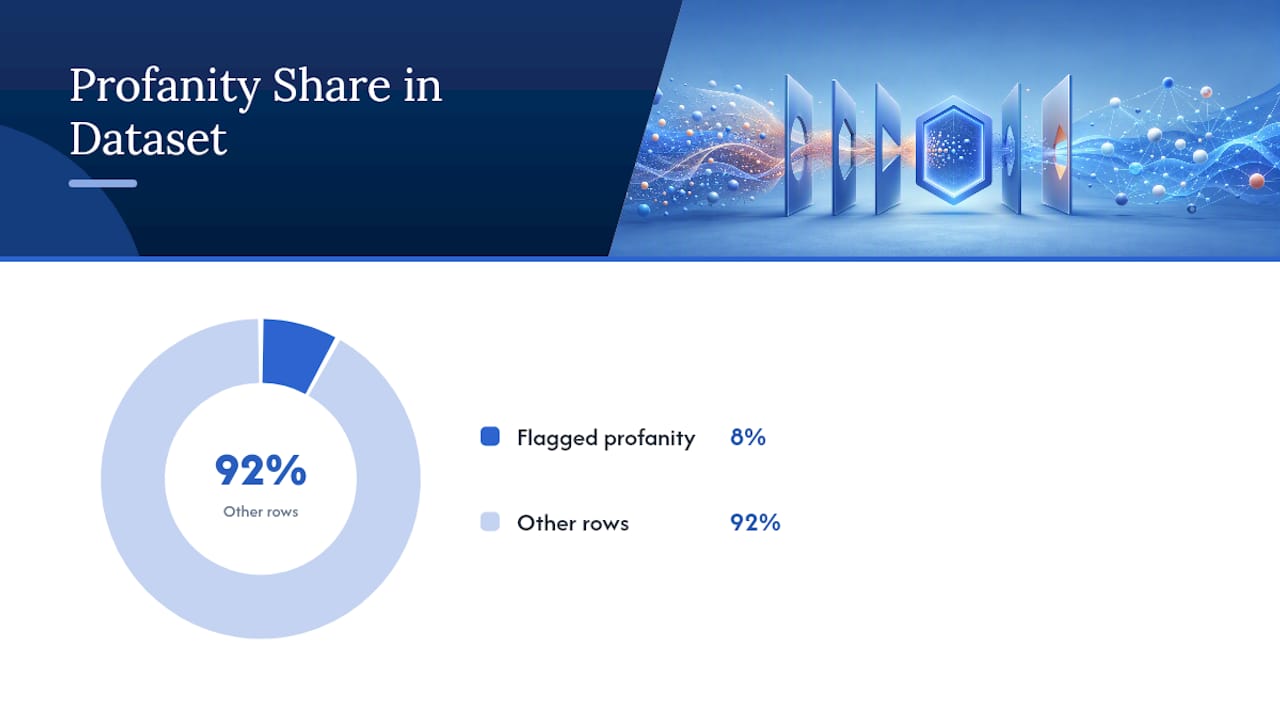
| Composition | Include counts and any sensitive fields | ”42,000 rows; no PII beyond ticket ID; 8% flagged for profanity.” |
| Collection | Name the sampling method plainly | ”Stratified random sample from Q1–Q2 2025 support queue.” |
| Preprocessing | State what was removed or altered | ”PII redacted via regex; raw text retained in a restricted store.” |
| Uses | List prohibited uses explicitly | ”Not validated for sentiment outside support context.” |
| Distribution | State license and access gate | ”Internal use only, CC-BY-NC equivalent for research partners.” |
| Maintenance | Name an owner, not a team inbox | ”Owned by Data Platform team; reviewed quarterly.” |
Attach a machine-readable manifest alongside the prose. A Croissant JSON-LD snippet describing fields, types, and license terms lets tooling validate the dataset automatically, though it complements the datasheet rather than replacing it. Croissant standardizes discovery metadata; it does not capture the ethical reasoning a human has to write down.
Pro Tip: Write the executive summary last. You will not know what actually matters about the dataset until you have filled out the other six sections.
Who Owns the Datasheet After Launch?
Dataset creators should own the content, since contextual knowledge about why choices were made is most accurate while the team that made them is still around. Microsoft’s Aether guidance backs this split: creators own contextual documentation, engineering owns the technical metadata layer. Reviewers should include product, legal, and reliability engineering before a dataset ships.
Update triggers include any preprocessing change, relabeling pass, licensing amendment, or code change that touches how data gets sampled. Tie each trigger to a version bump, the same way you would version an API.
- Bump the minor version for relabeling or added rows
- Bump the major version for a schema or licensing change
- Require a “datasheet updated” checkbox before the release ticket closes
Pro Tip: Add the datasheet checkbox to your release pull request template, not a separate wiki page. Documentation that lives outside the shipping workflow gets skipped.
How Datasheets Become Review Gates and Monitoring Checks
A datasheet only prevents failures if someone reads it before the dataset touches production. That means mapping specific fields to specific gates, not filing the document and hoping.
- Composition → class-balance check. If the datasheet lists a skewed label distribution, require an automated test that flags training runs where the skew exceeds the documented ratio.
- Collection → demographic coverage test. If the collection section names a population, verify sampled coverage against that population before sign-off.
- Distribution → legal review. Any license or access restriction listed triggers a legal check before external release.
- Maintenance → drift monitor. The update cadence field sets the interval for re-running validation against fresh production data, a natural tie-in to dataset shift monitoring.
| Datasheet field | Review gate | Monitoring metric |
|---|---|---|
| Composition (class balance) | Automated balance check pre-training | Label distribution drift over time |
| Collection (sampling method) | Coverage audit vs. named population | Demographic representation drift |
| Distribution (license) | Legal sign-off before external release | License violation alerts |
| Maintenance (update cadence) | Scheduled re-review at stated interval | Staleness flag past cadence date |
This mapping turns a static document into a working part of your audit checklist rather than a compliance artifact nobody reopens.
Common Mistakes Teams Make Filling Out Datasheets
The most common failure is treating the datasheet as a one-time task. Teams write it at launch, never touch it again, and six months later the document describes a dataset that no longer exists. The fix is procedural: wire an update checkbox into the release pull request so a new version can’t ship without a documentation touch.
The second failure is vague answers. “Data was collected from various sources” tells a reviewer nothing. Fix this with a short mandatory-fields checklist (the six essentials from earlier) and a reviewer who rejects submissions that leave them blank.
- Vague sampling descriptions hide coverage gaps that surface only after deployment
- Missing prohibited-use statements leave legal exposure when a model gets repurposed
- No named owner means nobody updates the document when the dataset changes
Illustrative example: Glitchive’s case archive documents an incident where an AI system pulled bad guidance from web-sourced training data, including advice to eat rocks and add glue to pizza. A datasheet with a documented collection process and explicit source-quality notes is exactly the kind of artifact that makes a failure like that traceable after the fact.
What Legal and Ethical Questions Does a Datasheet Need to Answer?
Privacy and consent belong at the top of the composition and collection sections, not buried as a footnote. If the dataset contains personal data, the datasheet needs to state what was collected, whether subjects consented, and whether any anonymization or redaction happened before storage. If the answer is “we’re not sure,” that uncertainty itself needs to be written down, because a reviewer downstream can’t assume clean provenance.
Licensing sits in the distribution section, and it needs specificity rather than a generic label. “Research use only” means something different from “commercial use permitted with attribution,” and a model trained on the former can create real liability if it ships in a commercial product. Datasheets should state the license verbatim and name any third-party rights that constrain redistribution.
Restrictions on use often get skipped because they feel obvious to the creator and aren’t obvious to anyone else. A medical imaging dataset collected under an institutional review board protocol likely has explicit prohibitions against re-identification attempts or use outside the approved research scope. Write those prohibitions into the uses section directly. A reviewer should not have to track down the original ethics approval to learn what’s off limits.
Consent questions get harder with scraped or aggregated data, where individual notification is often impossible. In those cases, the datasheet should document what steps were taken to minimize harm. Removing personally identifiable fields, filtering for public-facing content only, or applying differential privacy techniques all count as answers worth recording, even when the underlying consent question has no clean resolution.
What Do Well-Documented Datasheets Look Like in Practice?
The strongest examples share a pattern: they answer every mandatory field with specifics, not categories. A well-documented image dataset states the exact camera equipment, lighting conditions, and geographic distribution of photographers, not just “images were collected from volunteers.” A well-documented text corpus names the exact publication date range and the filtering rules that excluded low-quality sources, rather than describing the source as “web text.”
The original paper’s own prototype datasheets demonstrate this level of specificity across a handful of well-known datasets, walking through composition and collection questions with concrete numbers rather than approximate ranges. That level of detail is the bar, not an aspiration.
Domain matters for what “well-documented” even means. A healthcare dataset needs explicit answers about de-identification methodology and institutional approval that a product-review dataset simply doesn’t need. A financial dataset needs explicit answers about survivorship bias and time-period coverage that an image-classification dataset doesn’t need. Copying a generic template without adapting the composition and legal sections to the domain produces a datasheet that looks complete and answers nothing useful.
The common thread across genuinely useful examples is that the collection and preprocessing sections read like a methods section in a research paper, not a marketing summary. If a datasheet’s collection section could describe five different datasets, it needs more specificity.
Which Tools Help Teams Create and Maintain Datasheets?
Most teams start with a plain markdown or Word template stored next to the dataset in version control, which works fine as long as it’s actually versioned alongside the data rather than in a separate wiki. The template earlier in this article is built for exactly that workflow.
For machine-readable metadata, Croissant has become the closest thing to a standard for exposing dataset schema, types, and licensing in a format that ML tooling and dataset platforms can parse automatically. It’s increasingly adopted by dataset repositories specifically because it makes datasets discoverable without requiring a human to open a PDF. Pairing a Croissant JSON-LD manifest with a prose datasheet gives you both machine discoverability and human-readable reasoning in one package.
Some teams tie datasheet validation directly into CI. A release pipeline can check that a manifest file exists, that required fields are non-empty, and that the version number in the manifest matches the dataset’s git tag, which catches the “we forgot to update it” failure before it reaches a reviewer. For teams working with language or text data specifically, the data statements guide from the University of Washington’s Tech Policy Lab offers a template tuned for linguistic and NLP datasets that pairs well with the broader datasheet structure.
None of these tools replace the manual reflection the format is built around. A validated manifest confirms a field exists. It says nothing about whether the answer inside that field is honest or complete.
Datasheets for Datasets and Governance for AI Reliability
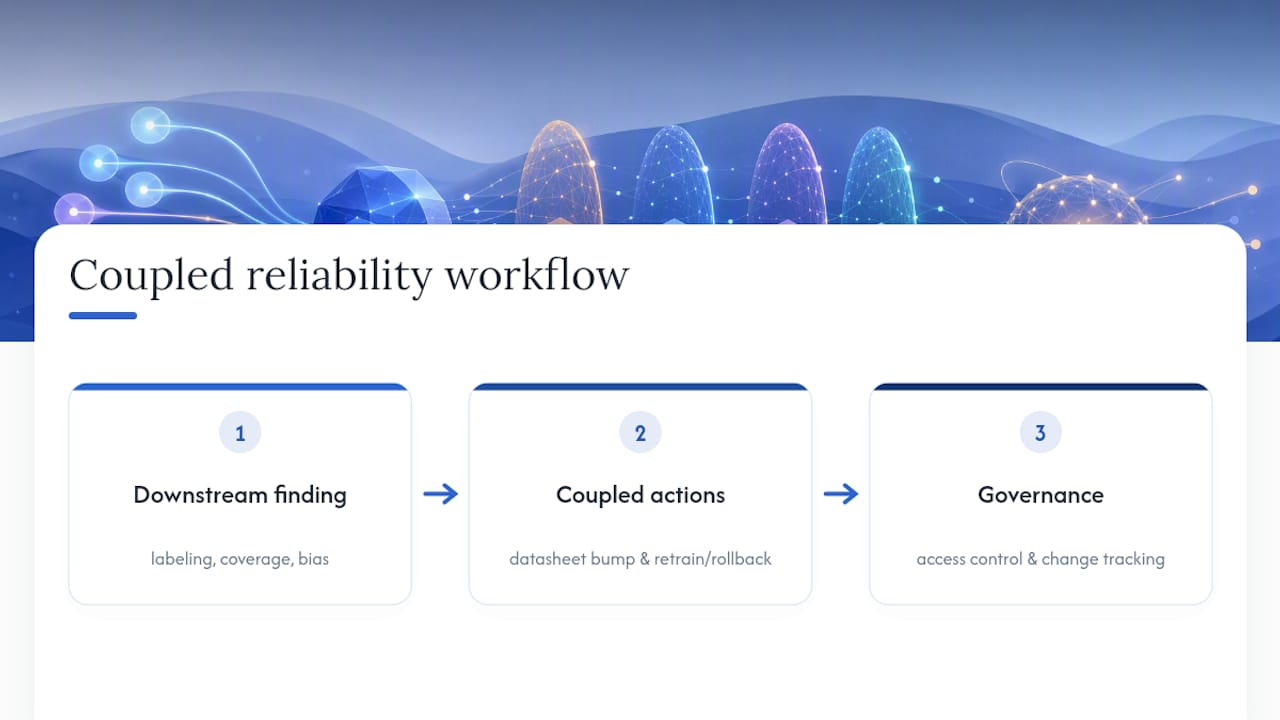
Datasheets should not live in isolation from broader data governance. The maintenance section’s update cadence and named owner connect directly to provenance and change-control practices covered in data governance for AI reliability, where access control and change tracking extend the same versioning discipline to the systems that consume the dataset, not just the dataset itself.
New findings are the most common trigger for an update that gets skipped. If a downstream team discovers a labeling error, a coverage gap, or a bias pattern after deployment, that finding needs to go back into the datasheet’s maintenance log, not just a bug tracker. The datasheet is the artifact future users will read before deciding whether to trust the dataset. If it doesn’t reflect known issues, it’s actively misleading, which is worse than having no datasheet at all.
A practical rule: any finding significant enough to trigger a model retraining or a production rollback is significant enough to trigger a datasheet version bump. Treat the two as coupled events, not sequential ones handled by different teams on different timelines.
Why Glitchive Treats Datasheets as a Reliability Control
Glitchive’s Tools & Evaluation coverage exists to give practitioners vendor-neutral ways to catch failures before they ship, and datasheets are one of the cheapest controls available. A documented dataset is a dataset someone actually reviewed. Readers who want to see how documentation gaps cause real incidents can walk through the Glitchive methodology or browse case studies like the production database wiped during a code freeze, a reminder that missing documentation and missing guardrails tend to fail together. Glitchive welcomes citations to this template and invites practitioners to contribute verified failure cases for the archive.
— GH
Sources
- Datasheets for Datasets (Gebru et al.)
- Datasheets for Datasets - Microsoft Research
- Croissant Format Specification
- A guide for writing data statements (Tech Policy Lab / UW)
FAQ
What Is an Example of a Datasheet for a Dataset?
The original Gebru et al. paper includes prototype datasheets for well-known datasets, walking through motivation, composition, and collection questions with concrete numbers rather than vague descriptions.
Where Can I Find Datasheets for Existing Datasets?
Some dataset repositories and papers publish datasheets alongside the data itself, though coverage is inconsistent across the field; Microsoft Research’s project page and the Croissant metadata ecosystem are good starting points for machine-readable equivalents.
What Are the Components of a Dataset a Datasheet Should Cover?
A complete datasheet covers seven categories: motivation, composition, collection process, preprocessing and labeling, intended and prohibited uses, distribution and licensing, and maintenance, following the structure set out in the original proposal.
How Do I Prepare a Datasheet for a New Dataset?
Start with the header fields (title, curator, version, citation, date), write the executive summary last, answer the six mandatory fields under each lifecycle category, then attach a machine-readable manifest like Croissant for automated validation.
Who Should Be Responsible for Updating a Datasheet?
The dataset’s original creators should own the content since their contextual knowledge is freshest, per Microsoft’s Aether guidance, while product, legal, and reliability engineering review before each release.